Connecting Integrations
Kenzsys becomes useful the moment data starts flowing. This page covers where to find the integrations panel, what each integration unlocks, the exact steps to authorize, how long the first sync takes, and what to do if something fails.
Before you start
You'll need admin or owner access in each external account you plan to connect. If your firm uses a marketing agency, ask them which Google login owns the Ads and Business Profile accounts — that is the login you must authenticate with. Connecting from the wrong Google account is the most common reason data fails to appear.
Where to find integrations
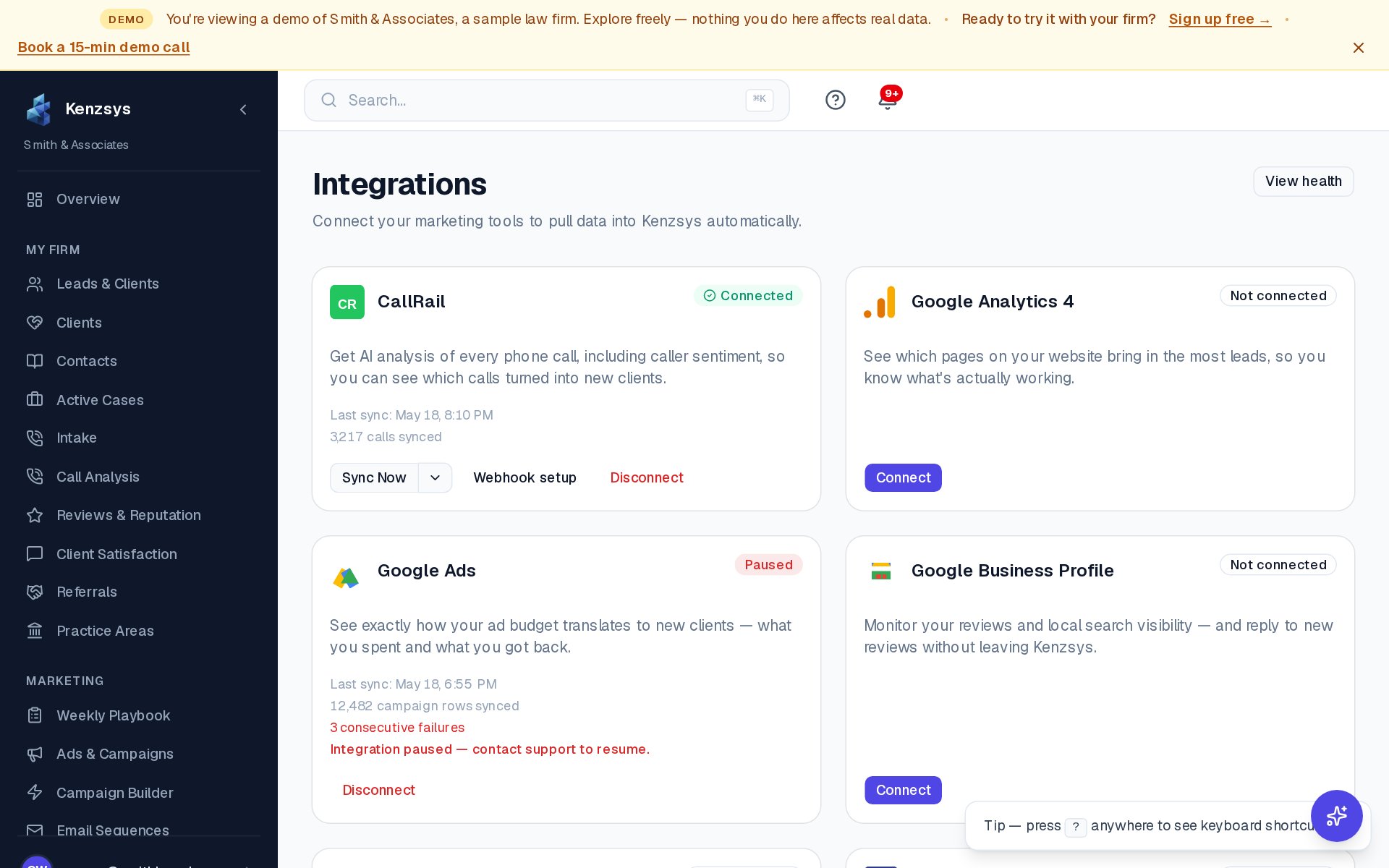
Click Settings in the left sidebar, then click the Integrations tab. You'll see a card for each supported provider with one of three statuses: Connect (not yet linked), Connected (live with a "last sync" timestamp), or Reconnect (token expired — needs a re-auth).
What each integration does
- Google Ads — pulls ad spend, campaign performance, impressions, clicks, and conversions. Required for cost-per-lead and ROI metrics.
- Meta — pulls Facebook and Instagram ad spend and performance for firms running paid social campaigns.
- CallRail — pushes every tracked call into Kenzsys as a lead, with caller info, recording URL, source, and call duration.
- Google Business Profile — syncs reviews, star rating, photo count, search impressions, and direction requests for local SEO tracking.
- Clio — pulls active matters and closed cases so retained-client revenue can be matched back to the lead that produced it.
- Google Search Console — pulls organic search query data so you can see which keywords drive traffic to your site.
- Lawmatics — alternative to Clio for firms using Lawmatics as their CRM and intake platform.
Step-by-step OAuth flow
The connect flow is the same for every OAuth-based provider (Google Ads, Meta, GBP, Clio, GSC):
- On the integration card, click Connect.
- A popup window opens to the provider's sign-in page. Sign in with the account that owns the data you want to sync.
- Review the requested permissions. Kenzsys always requests read-only access (with the exception of Clio, which is strictly read-only).
- Click Allow or Authorize. The popup closes automatically.
- If the provider has multiple accounts under one login (common with Google Ads MCC managers and GBP listings), Kenzsys will prompt you to pick which one to link.
- The card flips to Connected and the first sync begins immediately.
CallRail is the exception — it uses an API key instead of OAuth. Generate the key in CallRail Settings > Integrations > API, paste it into the Kenzsys CallRail card, and click Save.
How long does the first sync take?
Most integrations complete their initial backfill within 5 to 15 minutes. Google Ads and Clio take longer because they pull more history: Google Ads backfills the last 90 days on first sync (extending to 13 months over the next 24 hours), and Clio pulls the last 12 months of matters. After the initial sync, all integrations update automatically — CallRail in real time, Google Business Profile weekly, and the rest daily.
Empty state by design: Until an integration is connected, the related widgets show "Not connected — connect to start syncing" instead of placeholder numbers. Kenzsys never displays fake or sample data.
What to do if a connection fails
If a card shows Failed or stays at "Connecting…" for more than 15 minutes, try these in order:
- Confirm you used the right account. For Google Ads, the account must have direct access to the Ads customer ID, not just Analytics. For GBP, the account must be an Owner or Manager of the listing.
- Click Reconnect. Many failed connections clear on the second attempt because OAuth caches resolve.
- Check for popup blockers. The OAuth window must open in a popup — Safari and some browser extensions block it silently.
- Email support. If the issue persists, write to hello@kenzsys.com with a screenshot of the integration card and the provider you're connecting.
Security note: Kenzsys never stores your password for any provider. We store only encrypted OAuth tokens (or API keys for CallRail). You can revoke access from the provider's account settings at any time, and reconnecting takes about 30 seconds.